Managing Your Makeup Day Signup Form
Your Makeup Day signup form and responses are stored in your Google Drive. Because the form belongs to your school, Stomping Ground Photo does not have access to your form or response data.
View Responses & Export Your Signup List
- Open your Google Form.
- Click the Responses tab.
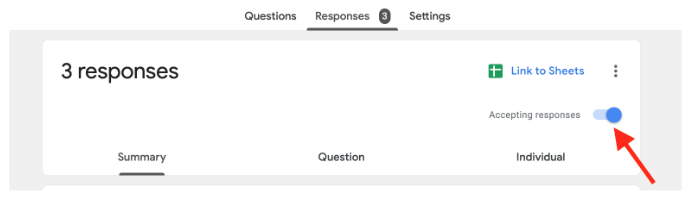
- Click the green Google Sheets icon to create (or open) your response spreadsheet.
Your spreadsheet will automatically update with each new signup and can be used as your scheduling list on Makeup Day.


We recommend closing responses approximately 3 days before Makeup Day. Once responses are closed, families will no longer be able to sign up for Makeup Day.
To close your form:
- Open your Google Form.
- Click the Responses tab.
- Turn Accepting responses off.